
Did you know that the Autonomous Community of the Region of Murcia has its own official solution for paying online? It is the CARM payment gateway
This platform is the digital bridge designed so that any citizen or company can settle their debts with the regional administration without having to set foot in a bank branch. Basically, it is the virtual cashier from the Region of Murcia.
What is the CARM payment gateway?
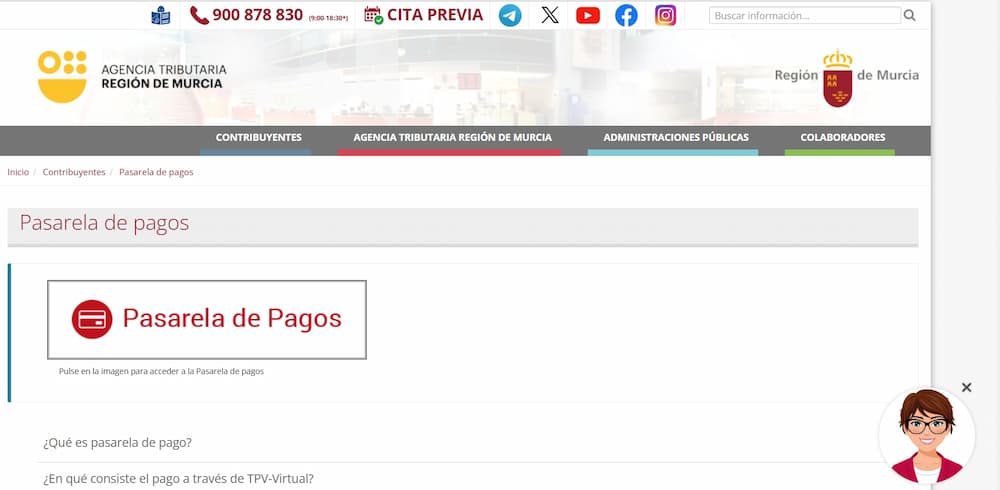
It is the official virtual POS of the Tax Agency of the Region of Murcia, which works as a secure digital counter, designed specifically so that you can pay your tax obligations without needing to physically go to a bank branch.
In essence, it is the centralized tool that the autonomous community of Murcia makes available to citizens and businesses to make online payments.
It not only supports regional administration, but also various municipalities with agreements, simplifying the collection of fees, taxes, and fines in an agile and legal manner.
What is it mainly used for?
To pay debts, regional taxes, fees, public charges, fines, and any tax receipt from the CARM or from participating municipalities. Accepts Visa and Mastercard credit and debit cards, and in many cases also Bizum.
Now, a necessary clarification
Unlike gateways like Stripe or LapinoPay, the CARM is not designed for businesses or online stores.
It is an administrative tool, designed solely and exclusively to facilitate payments to the Public Administration of the Region of Murcia. If you have an online store, this is not your payment gateway.
Therefore, if you have a debt with the Murcia tax authorities, this is exactly what you need.
What can you pay in the CARM payment gateway
So you don’t get lost among codes and models, here is a summary of what you can pay through this platform, which is open 24 hours a day, 7 days a week:
1. Administrative fees and official forms
It is the most common thing people use for their payment. Every time you request a specific service from the community, there is usually a fee involved.
- Education: for the payment of academic degrees, exam fees for civil service exams (the famous «exam fee») or language school fees.
- Licenses and permits: if you enjoy the outdoors, here you pay for hunting and fishing licenses. It also includes environmental permits or industrial licenses.
- Certificates: any official document that requires an administrative stamp usually goes through here.
2. Taxes and settlements (Murcia Tax Agency)
This is where things get serious, because this section connects directly with the ATRM to manage the taxes that depend on the region:
- Inheritance and Gift Tax: to process inheritances or legacies.
- ITP and AJD: the Property Transfer Tax (if you buy a used car or a second-hand home) and Stamp Duty.
- Specific rates: such as sanitation or taxes on gambling.
3. Fines, penalties and other public payments
Nobody wants to go through here, but if it has to happen, it’s better that it be quick, and in that respect the CARM payment gateway is effective:
- Administrative sanctions: fines related to transport, the environment, or public health.
- Late fees: if you missed a deadline, the system automatically calculates the surcharge so you can stay up to date without extra paperwork.
Quick look: what role do you have in your hand?
| Si tu documento dice… | Es probable que sea… | Usual procedure |
| Model 046 | General rate | Exams, degrees, licenses. |
| Model 600 | Tax (ITP/AJD) | Vehicle or apartment sale and purchase. |
| ATRM Clearance | Tax debt | Specific regional taxes. |
4. Other procedures and the user’s reality
In addition to the above, you can pay from tickets to regional museums even services for public residences or public prices for training courses.
How the CARM Tax Agency payment gateway works step by step
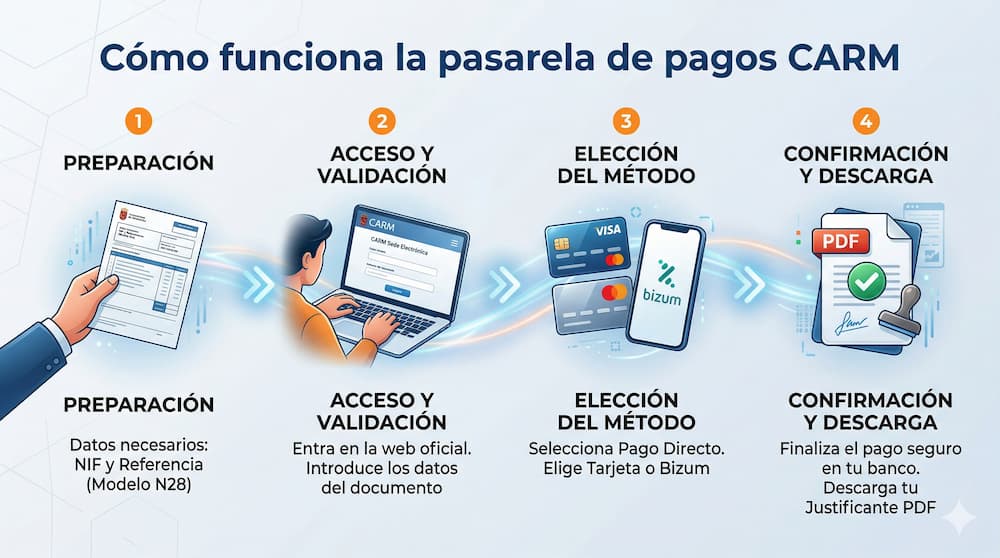
Although on the official platform you can see a CARM operating manual, in this section I leave you the summary of the process, in case you need to use that gateway:
Step 1: access the gateway
Enter the official website Payment Gateway CARM and on the main screen you will see two main options: “Direct Payment” and “My Debts”.
Step 2: choose how you want to identify yourself
Below, you have two options depending on what you need:
- The fast track or direct payment: no you need a digital certificate or Cl@ve, since you only enter your NIF, the code N28 (the long number that appears on your payment letter) and the amount.
- The organized route (my debts): here you do need a digital certificate. It’s the best option if you want to see a list of everything you have pending and choose what to pay all at once.
Step 3: Select your payment method
Once the system validates that your debt exists, choose how you want to release the money:
- Card (Visa or Mastercard): as in any online purchase, you enter the data in the bank's secure POS terminal.
- Bizum: if it is available for that procedure, enter your mobile number and confirm the transaction from your bank’s app.
Step 4: Confirm and save your “shield”
Enter the security codes requested by your bank and finish. The most important part comes now: download or print the receipt. Keep in mind that that PDF is your legal proof that you are now up to date.
Step 5: Do you need the receipt later?
If you lost the paper or they ask you for it again weeks later, don’t complicate things by searching for the original email. Go directly to the section of "Reprint receipt", enter the N28 and the NIF, and you'll have it back with you in seconds.
Differences between the CARM payment gateway and other online payment gateways
Before moving forward, you need to understand that, although both are called gateways, they play in completely different leagues. While the one of the CARM It is a mandatory mailbox to comply with the law, commercial gateways are engines designed to generate income.
Here is the real comparison so you don't mix up concepts:
CARM vs. Commercial Payment Gateways (Stripe, PayPal, RiskPaygo)
| Feature | CARM Payment Gateway | Online Payment Gateways Pro (RiskPaygo, Stripe) |
| Main objective | Collect regional fees, fines, and taxes. | Maximize sales and protect profit margin. |
| End user | Citizens and companies with tax debts. | End customers of e-commerce, SaaS, and services. |
| Flexibility | Rigid: You can only pay what the official document states. | High: Allows subscriptions, installment payments, and refunds. |
| Risk management | Basic (debt validation). | Advanced: Smart protection against fraud and chargebacks. |
| Money velocity | The money goes into public coffers. | Quick liquidation (en RiskPaygo could be daily). |
| Experience (UX) | Functional, but bureaucratic and somewhat slow. | Smooth, optimized for conversion, and frictionless. |
| Technical Support | Administrative hours and official tickets. | Specialized 24/7 support and human account managers. |
What is the key difference for your wallet?
If what you need is to pay the transfer tax on a car or an exam fee, the CARM it is your only way (there is no choice). But if you have a business on your hands, things change.
While public systems are designed so that “no one gets away without paying,” a solution like RiskPaygo is designed so that “no one stop buying from you”.
In the private sector, a failure in the payment gateway means immediate loss of money; that is why, in RiskPaygo we focus on safeguarding and avoiding absurd blocks that more traditional platforms often apply out of "excess of caution".
RiskPayGo as an alternative to using the CARM payment gateway
Although the CARM gateway has improved a lot, it remains a rigid and bureaucratic environment.
For the average citizen, it is a necessary evil, but for the business owner seeking agility, these public systems feel light-years away from what we offer in the private sector.
If you compare the friction of these official models with the shielding and fluidity of the payment gateway RiskPaygo, you realize that the fintech world understands much better that time is money.
While in the CARM a one-digit error can block your process for days, solutions like RiskPaygo are designed so that cash flow and business security never stop.
Frequently Asked Questions
Can I pay on the CARM gateway without having an account in a Spanish bank?
It depends on the payment method available for that procedure. In many cases you can pay with an international card, but if the system requires online banking from partner institutions, you will need an account in Spain. The best thing is to review the options before starting the payment.
What happens if I enter the payment details incorrectly?
If the payment has not been confirmed in the CARM payment gateway, you can usually repeat the process without any problem. But if it has already been made with incorrect details (for example, an incorrect model or reference), you will need to contact the administration to request a correction or refund. That is why it is essential to review everything before confirming.
Do I need a digital certificate to pay at the CARM?
It is not mandatory. For most payments (such as fees or fines), you can easily access it by entering the details shown on your physical document: the NIF, the reference number, and the exact amount.